
Parameters
Dollar Parameters
It would be unnecessary work to define a separate panel or compound widget (graphics object) for identical elements in a system. In order to avoid this, you can use panels. Dollar parameters ($) are provided in Control scripts for referencing panels (see the GEDI documentation ). These parameters are needed if you want to define a panel just once, but this same panel should be used more than once and in different ways in other panels.
Take for example a system with three motors of the same type. This motor type with its associated parameters such as required speed, actual speed, rated power etc., is defined in a dedicated "motor" panel, and inserted as often as necessary as a reference in the system panel. In the script it is not possible to access a particular "motor" datapoint variable, since there are three different motors and these will obviously have different values. Instead you can specify $ parameters which are resolved in the GEDI in a dialog box and which specify the datapoint actually used.
Syntax:
The leading $ can be followed by any number of digits from 0-9, or a character string. This string must either begin with a lowercase letter, a...z, an uppercase letter A...Z or an underline_ character. Examples of valid names are: $plant, $_PLANT, $Valve_01, $Plant_01Valve. Special characters are not allowed. The name can be of any length.
The character after the dollar sign ($) sign is interpreted as the display data type and capitalised names (such as $IMAGE or $BOOL) from the list below can appear anywhere in the name, they are even case-insensitive. If the first characters are lowercase, and are matching with a "data type" from the list, these will be shown as such. Otherwise a case insensitive search will be done with the uppercase data types from the list. The data type is chosen in the order shown in the table below.
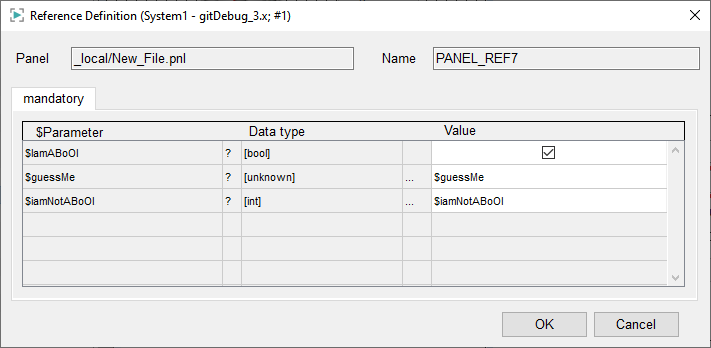
Small characters after the $ parameter win (3rd column), then a type (described in the table) is searched for in the rest of the name (1st column). If nothing was found, "[unknown]" is displayed (2nd column).
| First characters (Lowercase) | Type |
|---|---|
| $dpe | Datapoint element |
| $dpa | Datapoint attribute |
| $dpt | Datapoint type |
| $dp | Datapoint |
| $tp | Period in Seconds |
| $td | Date |
| $tt | Time |
| $ti | Point in time |
| $i | Int |
| $f | Float |
| $s | String |
| $u | Unsigned |
| $c | Char |
| $b | Bool |
| $COLOR | Color |
| $PANEL | Panel |
| $DPE | Datapoint element |
| $DP | Datapoint |
| $FONT | Font |
| $RULE | Rule |
| $MSGC | Message catalogue |
| $MSGT | Message text |
| $IMAGE | Image |
| $UINT | Uint (positive integer value) |
| $LANGSTRING | Language string |
| $BOOL | Bool |
| $BIT32 | Bool (Bit pattern 32) |
| BIT64 | Bool (Bit pattern 64) |
| $CHAR | Char (1 byte) |
| $DOUBLE | Double (A floating point value) |
| $FLOAT | Float (A floating point value) |
| $INT | Integer value (32 bit) |
| $ULONG | Ulong (positive integer value 64 bit) |
| $LONG | Long (Integer value 64 bit) |
| $STRING | String |
| $MIXED | Mixed (Contrary to anytype the variable type mixed gets each time a new type.) |
| $MAPPING | A Mapping (Mapping saves arbitrary key/value pairs.) |
| $TIME | Time (internal time format) |
| $UNSIGNED | Unsigned (positive integer value) |
Example: Dollar Parameter with String Constant
string x;
x = $valve+ "123" (where $valve is passed as "abc")
//becomes
x = "abc" + "123"
Therefore, you can work with dollar parameters($) in exactly the same way as with string constants.
Example: dpSet() with Dollar Parameter
dpSet($Motor+".Reqdvalue:_original.._value", MOTOR_REQD);Value Parameters
Value parameters involve passing a copy of an argument's value to a function, ensuring that any modifications within the function affect only this local copy, leaving the original variable unchanged. This "pass-by-value" mechanism is ideal when a function needs to operate on data without causing side effects on the caller's variables, commonly used for primitive types or when immutability is desired.
void foo(int a)
{
}

foo(1, 2, 3);
Optional Parameters
You may define optional parameters for functions. This means that these parameters must not be declared when calling the function.
Example - The default value of the second parameter is set to TRUE
myFunc(int a, bool b = TRUE)
{
  //....
}
A function with 2 parameters is declared. Here the second parameter can be left out when calling the function. If a parameter is not defined, the script uses the default value "TRUE". Therefore, in this example the parameter "bool b = TRUE" is declared as an optional parameter since a value was already assigned to the parameter.
After an optional parameter, other optional parameters can be declared. However, you must not declare a non-optional parameter after an optional parameter!
The function can be called as follows:
myFunc(3, FALSE); // both parameters
myFunc(3); //only the fixed first parameter. The 2. is by default "TRUE"
Optional parameters can only be constants NOT results of an expression! See the following example:
myFunc(int a, string b = (string)TEST)
{
  DebugN("b="+b);
}
main()
{
  myFunc(1, "Hello");   //works
  myFunc(1);            //works
}
//--------------------------------------
myFunc(int a, string b = "Test")
{
  DebugN("b="+b);
}
main()
{
  myFunc(1, "Hello");  //works
  myFunc(1);           //works
}Optional parameters of the data type langString are not allowed! The default value will not be passed!
Reference Parameters
If a function is declared with test (int &a, float &b, string c), then the parameters a and b are known as reference parameters. This means that the arguments are also changed in the calling function. In the function call, only variables that are also suitable for being assigned values can be passed as reference parameters. These are simple variables or variables with an index for dyn_types. Implicit conversion is supported here.
If a function expects a reference and then receives invalid parameters, an exception for the invalid parameters is thrown.
If a function has a reference parameter (&), always call the function with the required type. If the function is not called with the required parameter type, an error will occur.
Example with a reference parameter
main()
{
  int a = 3;
  f(a);
  DebugN(a); //4 is output here
}
//...
f (int &x)
{
  x = 4;
}
Example without a reference parameter
main()
{
  int a = 3;
  f(a);
  DebugN(a); //3 is output here
  //...
}
f(int x)
{
  x = 4;
}
Function with an arbitrary number of parameters
CTRL functions may have an arbitrary number of parameters. The
arbitrary number of parameters is defined via va_list.
va_start sets the parameters into the va_list
variable. va_arg is like an iterator and it always handles the next
parameter of the va_list variable. va_end stops
the handling of the parameter list.
Va_list does not require a format string (like C) in order to determine the number
and types of the parameters. This information is already known. You do not need to
specify the types of the different parameters. You do not have to specify where the
parameters in the va_list begin either.
The following example shows how to pass different types of parameters and how to
access the parameters in the va_list via va_start,
va_arg and va_end.
Example for an arbitrary number of parameters
main()
{
  subfunc("Example1", 5, 'A'); //Pass the parameters
  subfunc("Example2", 'B', "Characters");
}

/* You do not have to pass the parameter types but create a prefix string */
void subfunc(string prefix, ...)
{
  int i, len;
  va_list parameters;

  //Iterate via va_arg
  DebugN("Iterate:");
  len = va_start(parameters);  //Returns the number of parameters

  for (i = 1; i <=len; i++)
    DebugN(prefix, va_arg(parameters)); //Print the parameters
  va_end(parameters); //va_end stops the handling of the list

  //Optional access to the parameters
  DebugN("Optional access");
  len = va_start(parameters);  //Returns the number of parameters

  for (i = 1; i <=len; i++)
    DebugN(prefix, parameters[i]); //Print the parameters
  va_end(parameters); //va_end stops the handling of the list
}