OPC UA Server CNS
This section describes the OPC UA CNS function of the WinCC OA OPC UA server which allows to map CNS views to the server's address space. Therefore the server address space is independent from the datapoint structure of the respective project and can be freely defined.
Using CNS means that no datapoint groups are required. The necessary structure of the CNS view can be defined via the Plantmodel Editor or control functions.
Configuration
The ID of the view which shall be mapped to the address space must be specified using the Plantmodel Editor. With this the corresponding View ID is mapped to the internal datapoint element Config.CNSView of the _OPCUAPvssServer DP. Only one view can be assigned to each server.
The OPC UA server checks the Config.CNSView datapoint element only on starting. If another view shall be mapped to the address space, the other view ID must be defined on the datapoint element. After that the server must be restarted. In case of an invalid view ID the server is shut down and the following error message is displayed::
SEVERE, 54, Unexpected state, CNSViewBrowser, Constructor, View 'View13' doesn't exist!
The WinCC OA system name and the view name are not part of the server's address space. The first level of the address space is always the first level of the defined CNS view which means the first node.
AccessLevel
The AccessLevel attribute must be used to define how the value of a variable can be accessed (read/write). The OPC UA server only represents nodes for which an appropriate AccessLevel is defined.
To define the AccessLevel for a node, the keyword OA:OPC with a value of data type UINTEGER_VAR must be stored in the node's UserData (either automatically via Plantmodel Editor - OPC or cnsSetProperty). All child notes for which the AccessLevel is not explicitly set inherit the AccessLevel of the parent node.
| Field | Bit | Description |
| Read | 0 |
Indicates if the value is readable. 0: Not readable 1: readable |
| Write | 1 |
Indicates if the value is writable. 0: Not writable 1: Writable |
| Alarm | 2 |
Indicates if the alert information is represented in the address space. 0: Alert information is not represented 1: Alert information is represented |
| History | 3 |
Indicates if the history of this value can be accessed. 0: Not readable 1: readable |
| Event | 4 |
Indicates if a dyn_string is linked where a base event can be sent from. 0: No events configured 1: Events are configured |
| Inheritance | 31 |
Indicates if the AccessLevel of this node is inheritable or only valid for this node. 0: Inheritable 1: Not inheritable |
Mapping to the server address space
Datapoints can be assigned to nodes of a CNS view. If a datapoint element is assigned to a node and the AccessLevel is defined, the object for this CNS node has the NodeClass "Variable" and represents the current value of the linked datapoint element.
CNS Nodes without any linked datapoint element are represented by objects with NodeClass "Object".
Consider the following information:
- A node without AccessLevel is not represented in the server address space unless the AccessLevel of at least one child nodes is defined and the child node is assigned to a datapoint element
- A node with defined AccessLevel but without an assigned datapoint element is not mapped to the address space, unless there is at least one child node with an assigned datapoint element.
- A parent node with assigned datapoint element but without defined AccessLevel is mapped with NodeClass "Object" if the AccessLevel is defined for one of the child nodes.
- The structure of objects in the address space equates to the linked datapoint
structure. If a datapoint element structure is assigned to a node, the OPC UA
server appends all elements of the linked structure to the CNS node.
The data point element names of the linked structure are used for the OPC UA node ID. If the datapoint element names of the linked structure are conflicting with CNS nodes with the same ID, the OPC UA server displays an error message in the LogViewer. In this case the nodes which are already existing in the address space remain unchanged and the new conflicting nodes are not added to the address space.
-
Datapoint elements that are linked to a node must have a _alert_hdl config before creating the corresponding link. If the config is not available the required alarm conditions cannot be created.
Adding the config after linking the elements is not sufficient. The link to the node must be removed and newly added.
The attributes of a CNS view are mapped to the address space in the following way:
| CNS view | Address space | Comment |
| ID path | NodeId | The full ID path of the respective CNS node without system name and CNS view name. |
| Node ID | BrowseName | |
| Node name | DisplayName | The display name is shown in the language in which the server is started. To show the name of nodes in any of the other defined project languages, use the config entry "lang" or the manager option "-lang". |
| Node name | Description | Description always equates the DisplayName |
| UserData (OA:OPC) | AccessLevel | AccessLevel (Read/Write) of a CNS node is stored in its UserData |
| UserData (OA:OPC) | UserAccessLevel | UserAccesLevel always equates the AccessLevel |
Additional information
Changes to the CNS view
Following changes to the used CNS view are applied dynamically to the address space at runtime:
- Creating new nodes
- Deleting existing nodes
- Changing the node ID
- Linkage of datapoint elements with nodes
- Deleting datapoint element assignments
- Changing the AccessLevel of nodes
Modifications to the WinCC OA datapoint types (e.g. adding a new node to an existing datapoint type or changing the element type) are not applied to the address space at runtime. Therefore the server must be restarted after changing the datapoint type of a datapoint element (structure) which is linked to a CNS node.
Separator
On creating a CNS view an arbitrary separator can be defined. This character is also used as separator for the ID path. The CNS ID path is used by the server to create the OPC UA NodeId. In this case the character "." is always used as separator. If a datapoint element structure is linked to a CNS node the character "." is also used for adding the individual datapoint element names of the structure to the NodeId.
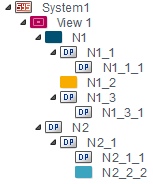
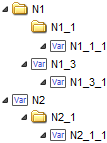
Example for mapping a CNS view to the server
The following example shows how a CNS view can be mapped to the address space of a OPC UA server.
| CNS view | Datapoint linkage | AccessLevel defined? | Mapped to server | ||
| N1 | No | No | Yes | ||
| N1_1 | Yes | No | Yes (as structure) | ||
| N1_1_1 | Yes | Yes | Yes | ||
| N1_2 | No | Yes | No | ||
| N1_3 | Yes | Yes | Yes | ||
| N1_3_1 | Yes | No | Yes | ||
| N2 | Yes | Yes | Yes | ||
| N2_1 | Yes | No | Yes (as structure) | ||
| N2_1_1 | Yes | No | Yes | ||
| N2_1_2 | No | No | No | ||