Creating datapoints
You can create datapoints with the ASCII Manager in one of two ways. Either, a data point is automatically generated if it does not exist as yet and if an attribute for an element of this datapoint is set or you can create datapoints using the keyword DpName. With this method, the ASCII Manager attempts to create a datapoint with the specified ID provided it exists. If it has already been assigned, the next available ID is selected and a message is displayed. This method is used mainly to update projects.
How to delete datapoint using the ASCII manager, see chapter Project engineering -> Mass configuration -> Templates.
 Example
| Dp Name | Type Name | ID |
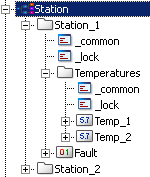
| Station_1 | Station | 4 |
| Station_2 | Station | 5 |
If you input this ASCII file, the datapoints Station_1 and Station_2 with IDs 4 and 5 are created.