Process image report
A selection of predefined queries are available under the Reporting option in the Start cascade. Here you can retrieve current process values (at the time the panel was opened) and various bits of status information for a group of datapoints. By selecting the option Datapoints > DPE Monitor from the Start cascade, a standard WinCC OA panel opens that allows analysing any datapoint element. A user always sees the actual process image (for more information on the datapoint element monitor in WinCC OA, see chapter Datapoint element monitor, basics ).
The datapoint elements selected for analysis can be restricted further by:
-
Datapoint groups (dpGroup)
-
Wildcard patterns for datapoint element names
Datapoint groups are a basic function of WinCC OA (see Introduction to datapoint groups). The following groups have been set up in the DemoApplication as examples:
-
Measured values
-
Count values
-
Set points
-
Binary commands
Further groups can be selected from the "Start -> Analysis -> User-defined" option of the Analysis element in the Start cascade. The groups are defined in a separate standard dialog. This dialog can be opened from the Start cascade by selecting "Groups "from the Datapoints option.
Figure: Current Process Image Report using Wildcards
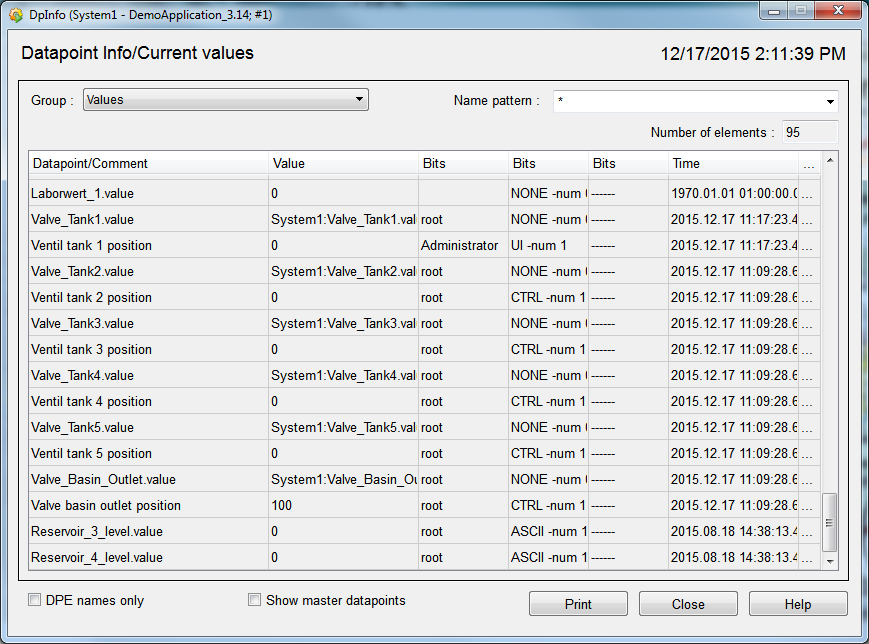
The second option uses a wildcard pattern to define a set of datapoints for reporting current values and status information. You can use * for any number of characters and ? for just one character. With ** you can span several levels of the datapoint structure. For more details about wildcards, see sections Wildcards and Wildcards in element names.
Clicking into the cells of the column with the ellipsis to the right of the time stamp opens a dialog with detailed datapoint information.
Simple operations
The following actions are possible activities when working with the reporting panel:
-
Opening the group measured values via the group combo boxes.
-
Input of wildcard patterns: "*.value" means all datapoint elements with just a two-level datapoint structure and in which the leaf element is called "value".
-
Input of the pattern: "*.C?.*MIN**" expects all datapoint elements that contain a C and just one further character in the second level called MIN in one of the subsequent levels.
Implementation:
The Reporting Panel is a common WinCC OA panel. The values are displayed from the standard element table (see also Table). The data is actually read using an SQL query (see also Basic information on SQL in Control) which is called in the Control script (Event scripts of the combo box and table). The Control script also post-processes and formats the data and enters the data in the table.



