Hello,
Is there a way to deregister a subproject and register it once again correctly?
Now when I integrate a subproject into a project I get an error message that the path does not exist.
There exists a workaround to solve this: I rename the subroject folder, register it, integrate in the project and then it works.
But I would like to know the "clean" way, so that I do not have to rename the subproject folder name.
thanks for help
Deregistering subproject
- adaneau
- Posts:310
- Joined: Tue Feb 21, 2012 9:49 am
Re: Deregistering subproject
Hi,
Just delete it from your project config file and it will not be used anymore
BR
Alexandre
Just delete it from your project config file and it will not be used anymore
BR
Alexandre
- riso77
- Posts:16
- Joined: Mon Jan 15, 2018 10:57 am
Re: Deregistering subproject
But removing the subprojects' path from the projects' config file does not remove the Subproject from the Subprojects table.
- adaneau
- Posts:310
- Joined: Tue Feb 21, 2012 9:49 am
Re: Deregistering subproject
Ah if you just want to unregister it, click the trash can on top of project management and delete it from list 
- schneebergera
- Posts:89
- Joined: Sun Apr 03, 2016 5:52 pm
Re: Deregistering subproject
Hello,
but it should. Is it possible to remove the subproject directly via the panel (project_admin_sub.pnl)
Please tell me your used WinCCOA version, incl. patchhlevel.
Pleases check the entries in the registration file.
[C:\\ProgramData\\Siemens\\WinCC_OA\\pvssInst.conf]
best regards,
Andreas
but it should. Is it possible to remove the subproject directly via the panel (project_admin_sub.pnl)
Please tell me your used WinCCOA version, incl. patchhlevel.
Pleases check the entries in the registration file.
[C:\\ProgramData\\Siemens\\WinCC_OA\\pvssInst.conf]
best regards,
Andreas
- riso77
- Posts:16
- Joined: Mon Jan 15, 2018 10:57 am
Re: Deregistering subproject
Hello Andreas,
my WinccOA is 3.15 P006
Yes, you were right, removing the entries from the [C:\\ProgramData\\Siemens\\WinCC_OA\\pvssInst.conf] made the subproject RCM dissapear from the project_admin_sub.pnl panel.
The subproject is listed only in project_admin_sub.pnl and not in the project_admin.pnl, but there is no trash can button to remove/deregister the subproject from the project_admin_sub.pnl panel.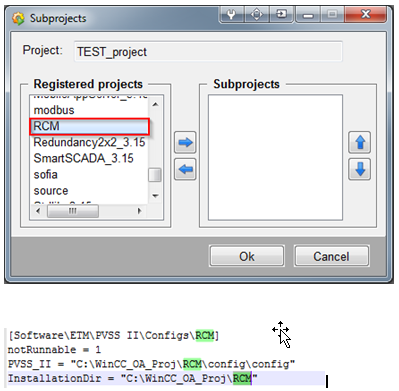
my WinccOA is 3.15 P006
Yes, you were right, removing the entries from the [C:\\ProgramData\\Siemens\\WinCC_OA\\pvssInst.conf] made the subproject RCM dissapear from the project_admin_sub.pnl panel.
The subproject is listed only in project_admin_sub.pnl and not in the project_admin.pnl, but there is no trash can button to remove/deregister the subproject from the project_admin_sub.pnl panel.
- Attachments
-