Hi,
In WinCCOA Version 3.15, Auto Login username: root Password: and Language loading issue,
we will launch a User Interface, the User and password loaded appropriately as mention in Config file but language is not loaded as mentioned.
Please find the attached snap shot.
Senthil M
Auto Login(root) - language is not loaded automatically
- SenthilMurugesan
- Posts:15
- Joined: Tue May 24, 2016 8:29 pm
Auto Login(root) - language is not loaded automatically
- leoknipp
- Posts:2928
- Joined: Tue Aug 24, 2010 7:28 pm
Re: Auto Login(root) - language is not loaded automatically
If you want to define the default language for a WinCC OA project you can use the config entry lang = "" in the [general] section.
When this entry is not defined the first language from the langs list is used as default language.
Please take into account that the number and order of languages cannot be changed after the project has been created.
Best Regards
Leopold Knipp
Senior Support Specialist
When this entry is not defined the first language from the langs list is used as default language.
Please take into account that the number and order of languages cannot be changed after the project has been created.
Best Regards
Leopold Knipp
Senior Support Specialist
- SenthilMurugesan
- Posts:15
- Joined: Tue May 24, 2016 8:29 pm
Re: Auto Login(root) - language is not loaded automatically
Hi Leopold Knipp,
Please see the snap shot, I have defined lang = "" string, still it's not loading the language properly.
It loads once you select username then select password, Hope this lang load script is define in key focus out of Username.
Thanks
Senthil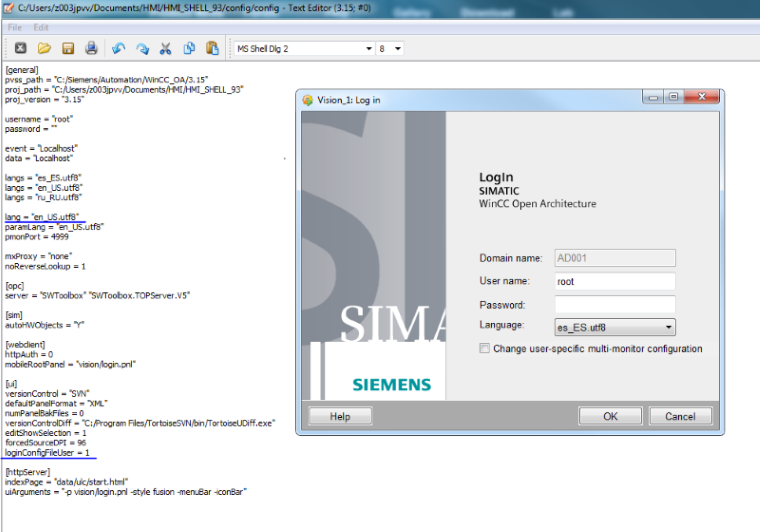
Please see the snap shot, I have defined lang = "" string, still it's not loading the language properly.
It loads once you select username then select password, Hope this lang load script is define in key focus out of Username.
Thanks
Senthil
- Attachments
-
- leoknipp
- Posts:2928
- Joined: Tue Aug 24, 2010 7:28 pm
Re: Auto Login(root) - language is not loaded automatically
For me it looks like the UI was started with the correct language. I can see english textes.
The default language for a user can be defined at the user settings. The UI is switched to the default language after the login using the login panel.
Best Regards
Leopold Knipp
Senior Support Specialist
The default language for a user can be defined at the user settings. The UI is switched to the default language after the login using the login panel.
Best Regards
Leopold Knipp
Senior Support Specialist
- SenthilMurugesan
- Posts:15
- Joined: Tue May 24, 2016 8:29 pm
Re: Auto Login(root) - language is not loaded automatically
Hi Leopold Knipp,
In the user setting, I have defined the language as "en_US.utf8"
In the Config Entry:
[general]
pvss_path = "C:/Siemens/Automation/WinCC_OA/3.15"
proj_path = "C:/Users/z003jpvv/Documents/HMI/HMI_SHELL_93"
proj_version = "3.15"
username = "root"
password = ""
lang = "en_US.utf8"
event = "Localhost"
data = "Localhost"
langs = "es_ES.utf8"
langs = "en_US.utf8"
langs = "ru_RU.utf8"
[ui]
versionControl = "SVN"
defaultPanelFormat = "XML"
numPanelBakFiles = 0
versionControlDiff = "C:/Program Files/TortoiseSVN/bin/TortoiseUDiff.exe"
editShowSelection = 1
forcedSourceDPI = 96
loginConfigFileUser = 1
so, lang = "en_US.utf8" is not setting automatically unless "keyfocusIn" and "keyfocusOut" of the Username.
Regards
Senthil . M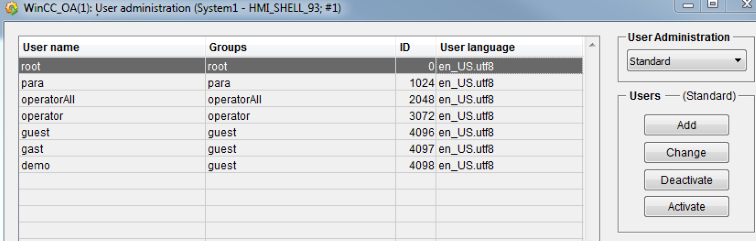
In the user setting, I have defined the language as "en_US.utf8"
In the Config Entry:
[general]
pvss_path = "C:/Siemens/Automation/WinCC_OA/3.15"
proj_path = "C:/Users/z003jpvv/Documents/HMI/HMI_SHELL_93"
proj_version = "3.15"
username = "root"
password = ""
lang = "en_US.utf8"
event = "Localhost"
data = "Localhost"
langs = "es_ES.utf8"
langs = "en_US.utf8"
langs = "ru_RU.utf8"
[ui]
versionControl = "SVN"
defaultPanelFormat = "XML"
numPanelBakFiles = 0
versionControlDiff = "C:/Program Files/TortoiseSVN/bin/TortoiseUDiff.exe"
editShowSelection = 1
forcedSourceDPI = 96
loginConfigFileUser = 1
so, lang = "en_US.utf8" is not setting automatically unless "keyfocusIn" and "keyfocusOut" of the Username.
Regards
Senthil . M
- Attachments
-