Discussions about product bugs & problems!
Note: This is no replacement for the Official ETM Support!
4 posts • Page 1 of 1
4 posts
• Page 1 of 1
riso77
Posts:16
Joined: Mon Jan 15, 2018 10:57 am
Missing parameters after invoking a universal test panel
Postby riso77 »
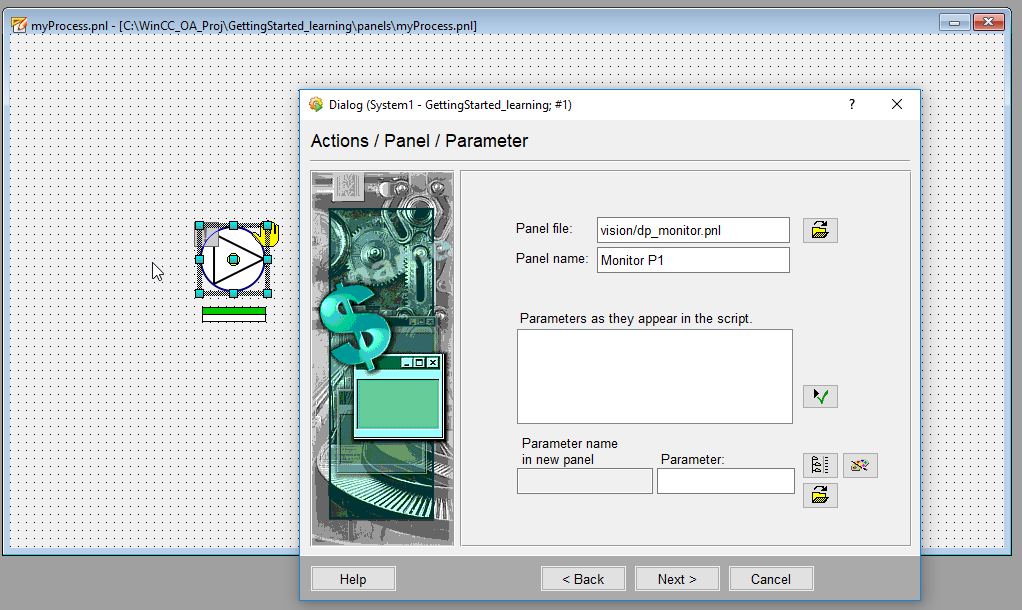
I am following the WinccOA Help topic: "Dialogs for Graphic Object - Test Panel"
In the 6th step there is written: "Select the file dp_monitor.pnl from the directory /panels/vision/ and confirm the dialog with Open." which i did.
There should appear the parameters as they appear in the script for dp_monitor.pnl, but in my case the parameter window stays empty.
Do you have any suggestions why loading the dp_monitor.pnl does not bring up these parameters?
Re: Missing parameters after invoking a universal test panel
Postby giorgiob »
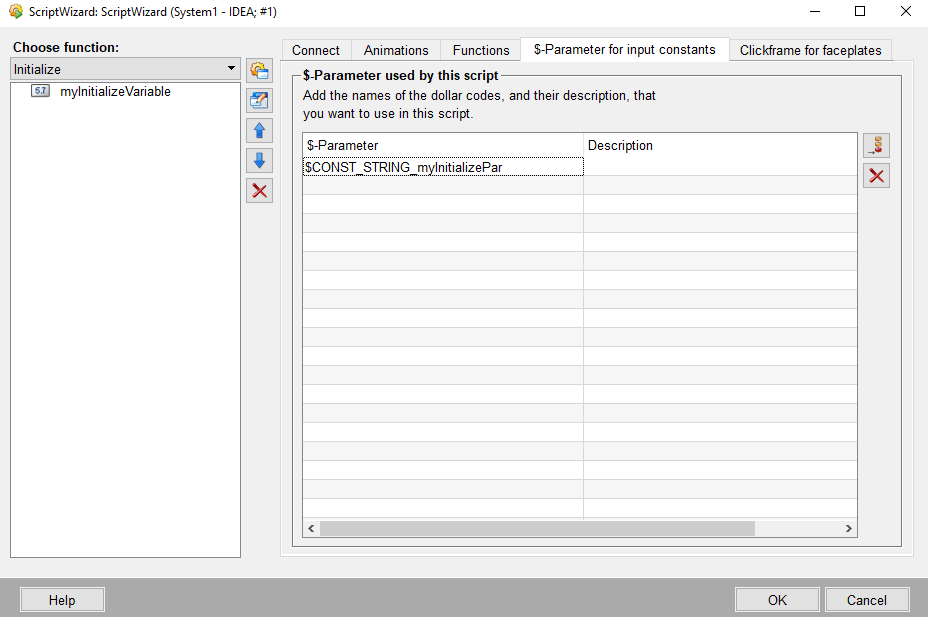
Hi, I've the same problem but, even switching to ScriptWizard setting, I cant' invoke the parameters by the calling panel. Instead, the ScriptWizard is showed and not the Actions Dialog of the SimpleConfiguration setting.
Maybe I did something wrong in defining parameters of the panel to call?