
Security
The Security tab allows configuring the authentication and security settings for the DNP3 connection. These settings protect the communication between the DNP3 driver and the outstation against unauthorized access and manipulation.
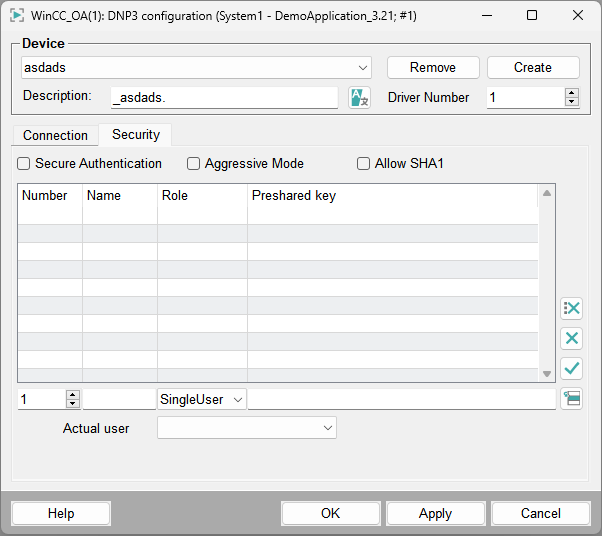
Enable the checkbox Secure Authentication to use DNP3 Secure Authentication. When enabled, critical operations are authenticated using cryptographic methods. This prevents unauthorized devices or users from issuing control commands.
The checkbox Aggressive Mode defines whether aggressive authentication is used. In aggressive mode, authentication is performed immediately without waiting for a challenge request from the outstation. This may reduce communication latency, but is not supported by all devices.
The checkbox Allow SHA-1 allows using the SHA-1 hash algorithm for authentication. This option ensures compatibility with legacy devices. For security reasons, stronger hash algorithms should be used if supported by the device.
The table in the Security tab defines authentication users and their keys. The following parameters can be configured:
| Parameter | Description |
|---|---|
| Number | Defines the unique identifier of the authentication user. |
| Name | Name of the authentication user used for identification. |
| Role | Defines the permission level of the user. Available roles depend on the device configuration. |
| Preshared key | Defines the cryptographic key used for authentication. This key must match the key configured on the DNP3 outstation. |
| Actual User | Specifies the currently active authentication user used for secure communication. |
Use the corresponding buttons to add, modify or delete authentication users and keys.